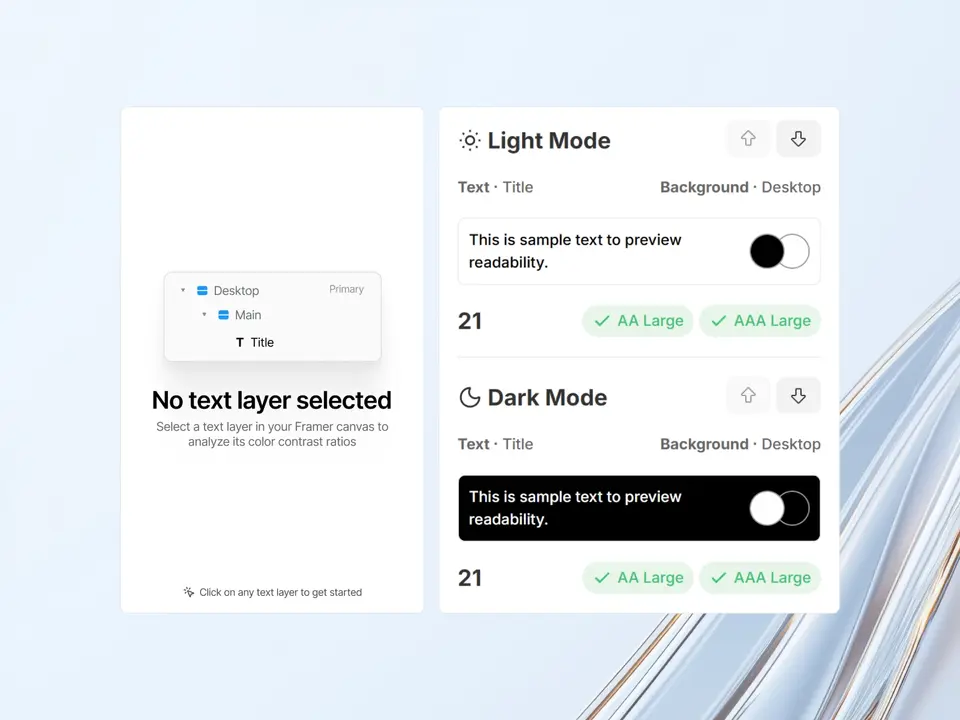
Smart Contrast ensures your accessible typography doesn’t slow down your design process. It allows you to select any text layer and immediately see how well it meets WCAG contrast requirements, without the need for manual colour picking.
The plugin automatically detects the background colour from the parent layer and evaluates the contrast ratio instantly. It’s a seamless way to build inclusive designs without leaving your canvas.
Key features:
- Instant Evaluation: Get the contrast ratio the moment you select a layer. No manual input required.
- Smart Detection: Automatically finds the relevant background colour from the first valid parent layer.
- Dual Mode Checks: View contrast results for both light and dark modes simultaneously to ensure consistency.
- Large Text Support: Automatically identifies “large text” according to WCAG standards and applies the correct thresholds.
It’s an essential utility for designers who want to ensure their work is accessible to everyone.
Created by Alexander Belt, this plugin integrates accessibility checks directly into your workflow.